Data Science: Local AI Model Benchmarks
A look at the performance of local AI models on a mid-tier gaming PC.
I believe local open-source models are the future of AI — today you can run one that rivals what frontier models did a year ago. So I spent a week finding out how far my mid-tier gaming PC could actually push them. Here’s the benchmark setup, the models I ran, and how they did.
Goals
While local models may not be able to compete with current frontier models, there have been a lot of promising developments in the past year. It really does feel like one can run a local model today that rivals what frontier models were doing last year.
I wanted to see how well I could run some models locally. However, my PC wasn’t built for this. It’s a mid-tier gaming PC with an RTX 4060 (8GB VRAM) and 32 GB DDR5 RAM. So it can certainly load ~8B parameter models if quantized properly, but how good do those do? And how good is good enough?
My main focus was on token generation, which is how fast the model will respond. I wanted something that would be at least 20 tokens/second. Another consideration is prompt processing. As I understand it, this is how fast the model will read the prompt, so if you provide a large document or code base, a higher prompt processing speed is better. Finally, there is also accuracy. It doesn’t matter if the model is fast if it can’t respond with some level of accuracy.
Setup
I decided to test out a Claude subscription and use it to generate the scripts that would help validate my local models. I started with Sonnet 4.6 and it did a good job, but then tweaked it with further prompting and also tried Opus 4.6 and Opus 4.8. The initial implementation by Sonnet was good enough, I just kept adding features so it’s not like if I had started with Opus it would have been any better.
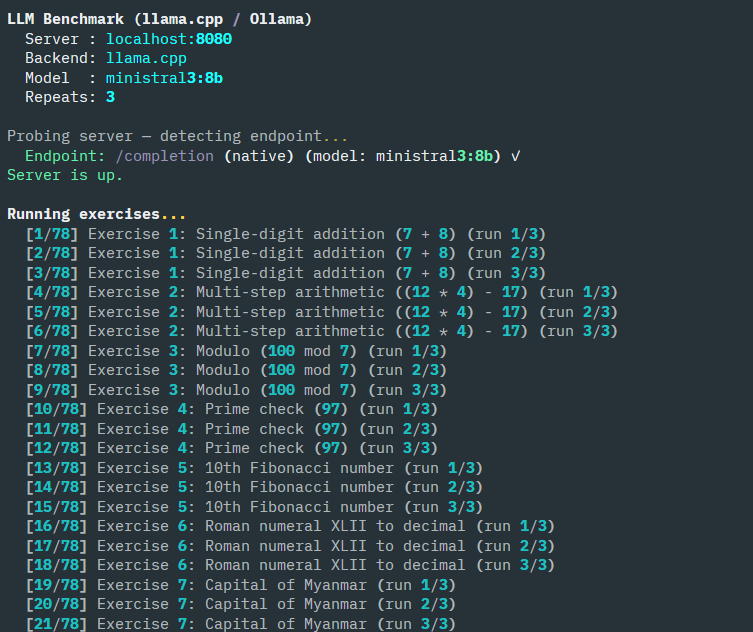
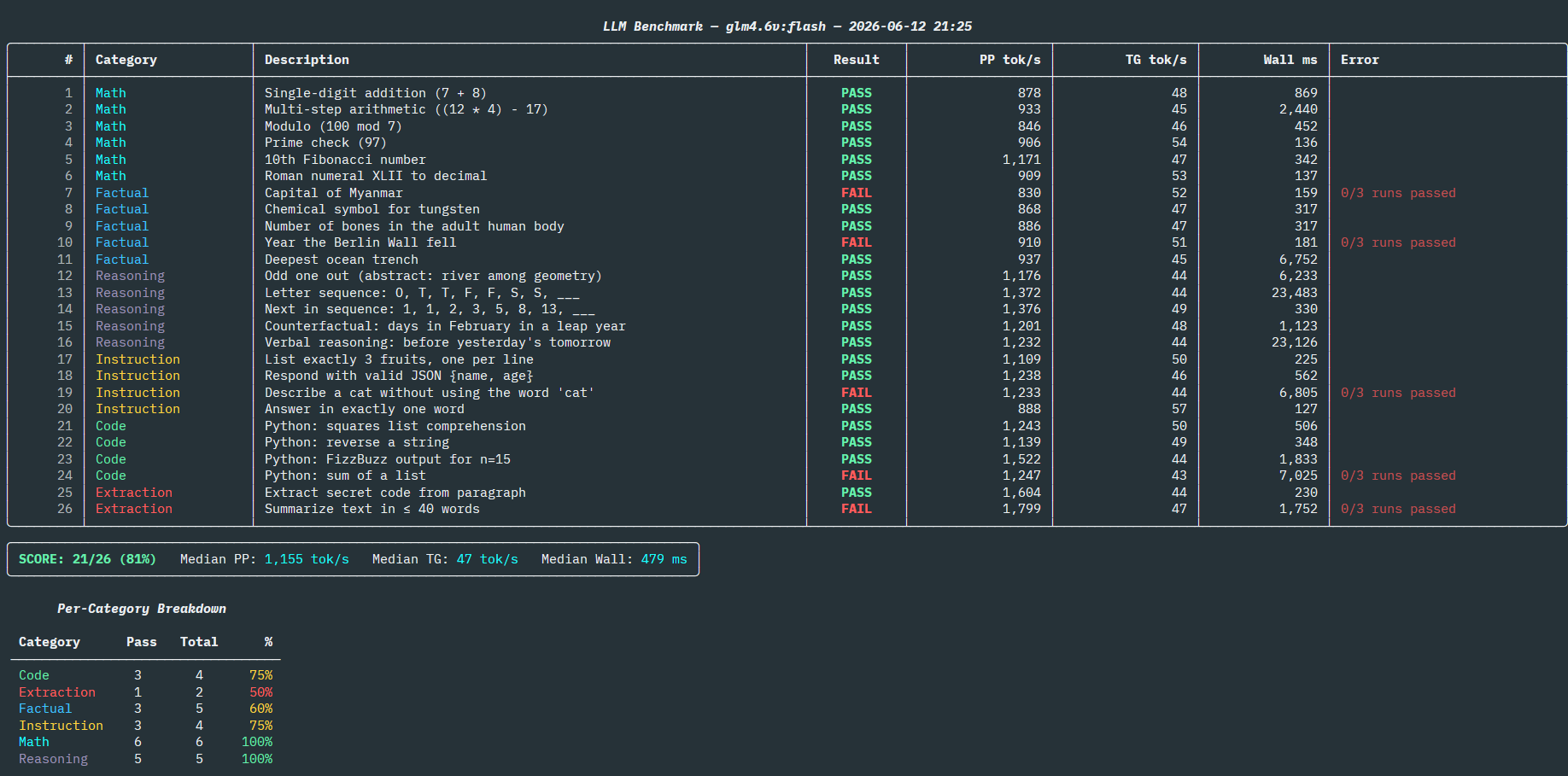
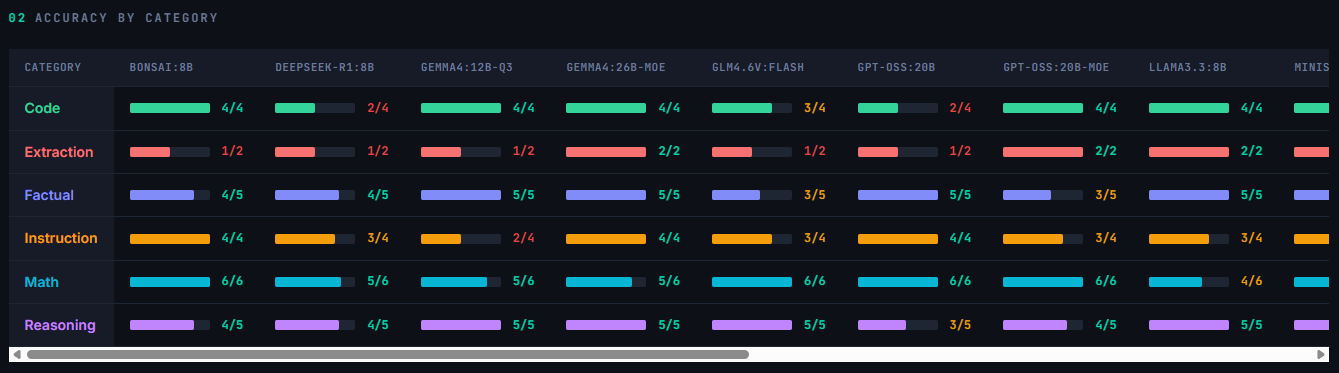
The gist of the code, which you can find here is a python script that will take some parameters depending on whether you are running models via llama.cpp or Ollama. It has a list of exercises across a variety of categories and goes through them one by one, capturing the result and performance. At the end it summarizes the results and outputs a JSON file for follow up. This JSON file can be used to generate a nicer cross-model report as an HTML page, which is where some of the screenshots you see in this post come from.
In terms of running llama.cpp, I used the TurboQuant fork, which you can find here and ran it locally via WSL.
Here are some of the questions which it would test:
1
2
3
4
5
What is (12 * 4) - 17? Reply with only the number.
What is the capital of Myanmar? Reply with only the city name.
What is the next letter in the sequence: O, T, T, F, F, S, S, ___? (Hint: think about counting.) Reply with only the single letter.
Respond with only a valid JSON object containing exactly two keys: "name" (any string value) and "age" (any integer value). No other text.
Write a single Python print statement using a list comprehension that prints the squares of 1 through 5. Provide only the code, no explanation.
Models
Based on my GPU’s VRAM, I focus a lot on 8-9 billion parameter models. At 4-bit quantization, these fit comfortably in my GPU and today’s models tend to be quite good even at these lower parameter counts. These models included:
- Deepseek-R1:8B
- GLM4.6V:9B-Flash
- Llama3.3:8B
- Ministral3:8B
- Qwen3.5:9B
- Qwen3:8B
At the larger end are the MoE models, or Mixture-of-Experts. These tend to have 20 or more billion parameters but only 3-4B are loaded at a time for inference. A clever trick people have discovered is that they can load the model into system RAM but push the experts to the GPU when inference is needed. This allows for faster generation than would otherwise be possible with limited hardware. The main one I wanted to test was Gemma4:26B. I tried the Qwen3.6:35B MoE but the larger model made it so that I couldn’t run anything else in my system and ultimately the python script running the benchmarks itself failed. I also tried GPT-OSS:20B which is another MoE with 3B active parameters, and ran it both the “standard” way and with the MoE offloading. This should be an interesting comparison with the Gemma4:26B model.
The Gemma4:12B and Phi4:14B did not fit at Q4 so I picked Q3 versions of them. I also ran the Qwen3:14B model at both Q4 and Q2. I had heard that some people find larger models at higher quantization can be better than lower models so I was curious what the results here would be.
Bonsai Ternary 8B model is one I’ve been very excited about. It’s only about 2GB in size due to its special architecture, but it needs a special version of llama.cpp to be able to work. The idea behind it is that it uses and was trained with ternary weights (1, 0, -1) instead of floating point numbers, so the size is tiny and the math simpler but the capabilities should remain comparable to other 8B models. Read more about it in their PrismML blog. The Phi4-mini is the smallest model I considered at just 4B and I stuck to Q4 even though I could have used a lower quantization. It’s also about 2GB in size, comparable to the Bonsai 8B.
I used a models.ini file to start llama.cpp in router mode so I didn’t have to specify each manually or tweak the parameters. Here’s a snippet of how mine looks like:
1
2
3
4
5
6
7
8
9
10
11
12
13
14
15
16
17
18
19
20
21
22
23
24
25
26
27
28
29
30
31
32
33
version = 1

# Global baseline optimizations for your hardware setup
[*]
flash-attn = on
n-gpu-layers = 99
cache-type-k = turbo4
cache-type-v = turbo3
cont-batching = true
host = 0.0.0.0
port = 8080
c = 32768

# Qwen 3.5 9B
[qwen3.5:9b]
model = /mnt/c/Users/strak/Projects/Models/Qwen3.5-9B-Q4_K_M.gguf

# Ternary Bonsai 8B
# Requires prisml executable, which doesn't use turboquant
[bonsai:8b]
model = /mnt/c/Users/strak/Projects/Models/Ternary-Bonsai-8B-Q2_0.gguf
c = 131072
cache-type-k = q8_0
cache-type-v = q4_0

# Gemma 4 26B A4B MoE
# Custom strategy where model is in RAM but experts get moved to VRAM for inference
[gemma4:26b-moe]
model = /mnt/c/Users/strak/Projects/Models/gemma-4-26B-A4B-it-UD-Q4_K_M.gguf
n-cpu-moe = 35
threads = 8
no-mmap = true
c = 131072
Results
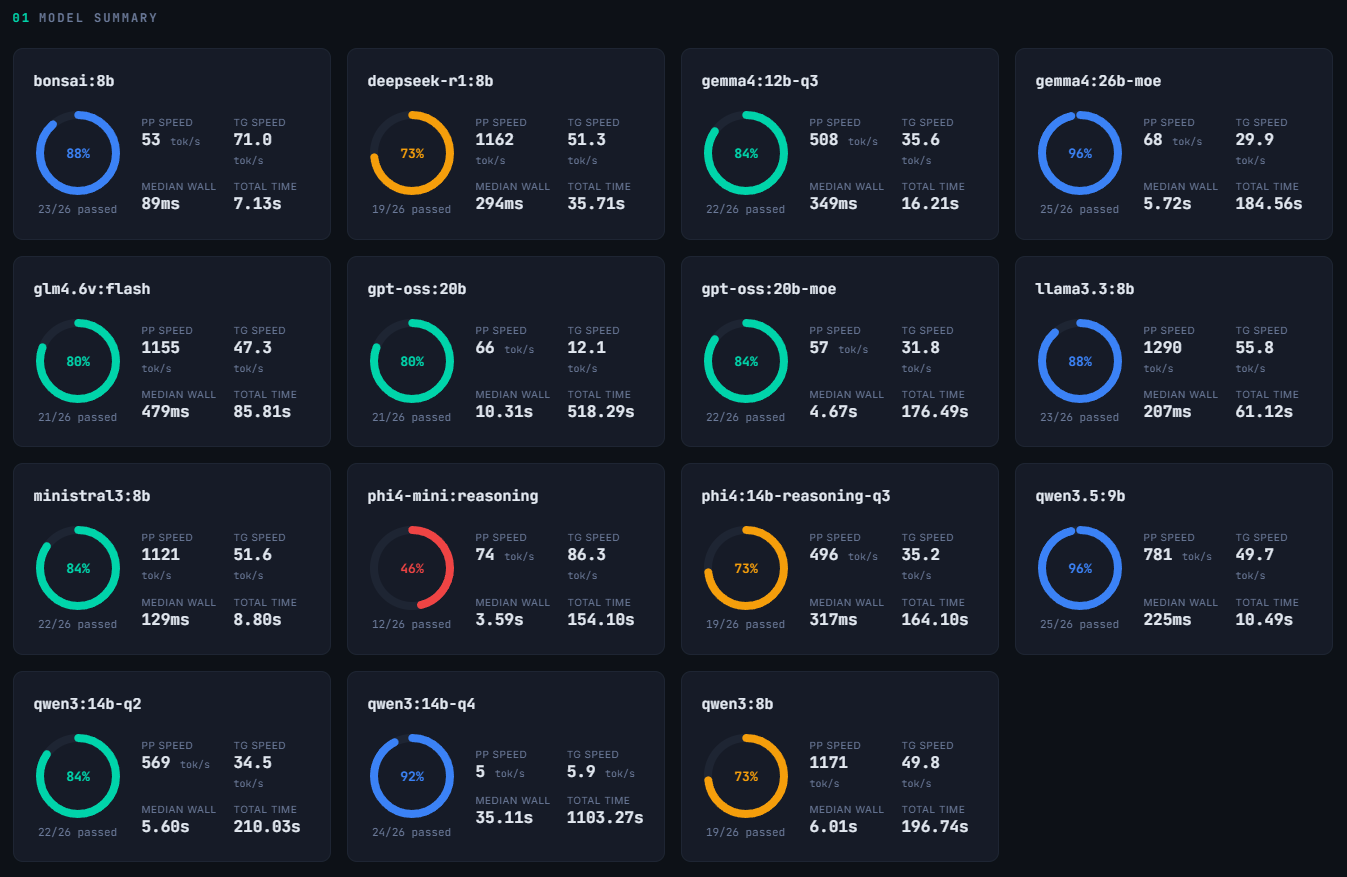
I was initially worried that all models would pass since the questions being asked seemed relatively simple. I was pleasantly surprised then to see that none of them scored perfectly, and some did quite poorly.
In terms of speed, the fastest were the Phi4-mini:4B and the Bonsai:8B Ternary model. However, the Phi4-mini scored the lowest passing only 12 of the 26 tests (46%) while Bonsai scored 88%, one of the highest results. At 71 tokens/sec I was very happy with the generation speed. I was surprised to see it was pretty low on prompt-processing and not fully sure why that is.
The next bracket of speed came with the slew of 8B models I tested. At Q4 these fit comfortably in my GPU and had token generation speeds of 45-55 t/s. Notable among these was the Qwen3.5:9B model. This was the most accurate model at 96% (rivaling Gemma4:26B but much faster) and had high prompt-processing, too, at nearly 800 t/s. Most of the other 8B models were in the ~84-88% accuracy range, though Deepseek-R1:8B and Qwen3:8B scored 73%.
The next bracket was for the largest models I ran, the 12-26B ones. When trying to load without any special settings, part of the model would spill into system RAM and significantly impact performance. This was particularly notable for Qwen3:14B-Q4 and GPT-OSS:20B which had speeds of 6 and 12 t/s, respectively. Human reading ranges from 3-8 t/s so watching these generate any output would be painfully slow.
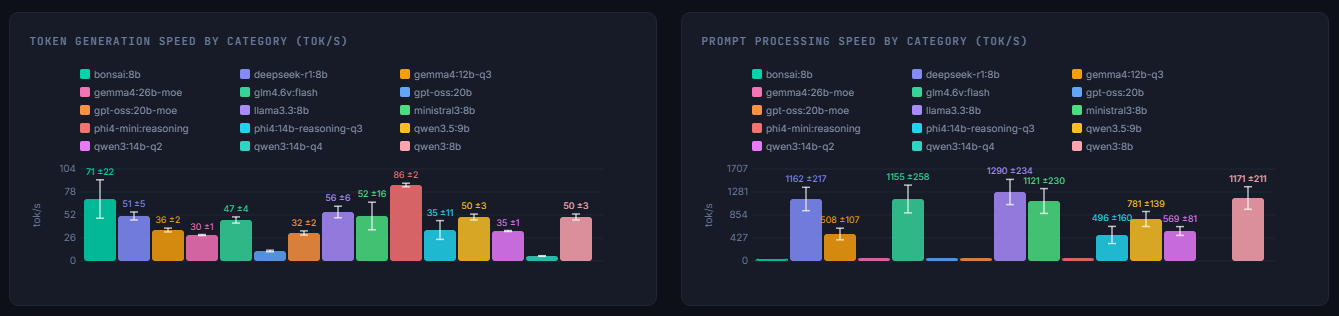
This is where clever strategies and higher quantization pay off. Qwen3:14B-Q2, Gemma4:12B-Q3, Phi4:14B-Q3 reached 35 t/s generation and the first two had 84% accuracy while Phi’s was at 73%. The heavy weights are both MoE models and I ran them in a special mode that only loaded the active experts into the GPU, with the rest being in RAM. Gemma4:26B-moe and GPT-OSS:20B-moe generated at 30 t/s with good accuracy, too. The only drawback is that system RAM is being used to hold the model and if too many background processes or applications are running, you can crash programs.
Conclusions
This was a very interesting exercise that has helped me figure out which models I should stick to on a regular basis. I was surprised to see how Qwen3.5:9B is better than Gemma4:26B-moe and the fact it can fit entirely on my GPU without clever tricks makes it easier to work with. The Bonsai:8B Ternary performed pretty well and I look forward to hearing if larger models with reasoning capability are made by that team. Honorable mention should be given to the 12/14B models Qwen3:14B-Q2 and Gemma4:12B-Q3, despite being higher quantization they generated tokens at a good enough speed and were comparable in accuracy to the 8B models at Q4. This makes them good options to consider.
One word of caution is that these tests are fairly simple and also fairly short. There are only 26 tests total and they ran 3 times, requiring at least 2 success to be counted. But because there are so few tests, a single failure amounts to a drop of ~4%. So I would not worry about minor differences in the accuracy here, considering anything above 80% to be good enough. After all, my focus was more on capturing speed than being robust about accuracy.
In practicality, I would more likely be using these for agentic work using a harness like pi.dev, so these tests aren’t fully representative of how they will perform there. However, if they struggle with these simple tests, then they are unlikely to do well in more complex agentic tasks.